Designing an accessible AI assistant for enterprise software
Improving conversational UX for operational workflows
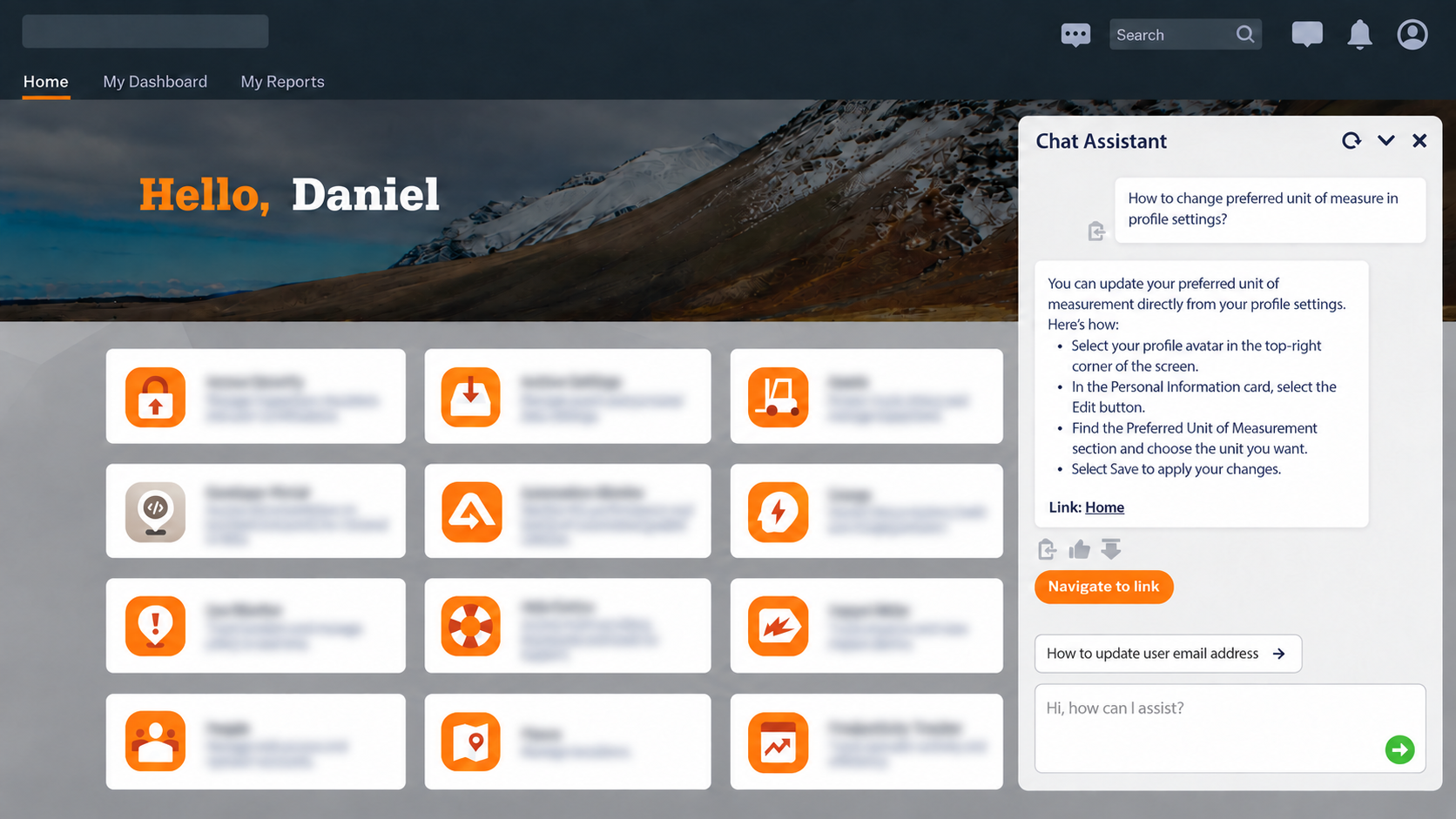
I wrote conversations and validated an in-product AI assistant that guided users through complex enterprise workflows. I contributed to its name, voice and tone, response structure, interaction patterns, accessibility, and user acceptance testing.
To protect confidential information, I have generalized product details and redacted proprietary information.
Problem:
Users needed reliable answers while navigating complex enterprise applications. Traditional search relied on exact terminology, while AI-generated guidance needed to be accurate, accessible, actionable, and transparent when an answer could not be verified.
Solution:
I developed a conversational content model with suggested prompts, step-by-step responses, descriptive actions, feedback controls, and clear recovery paths. I also helped define the assistant's name, voice and tone, accessibility standards, and UAT process.
The chatbot's responses were designed and evaluated against six quality criteria:
Accurate
Instruction-following
Relevant
Complete
Accessible
Consistent with brand voice and tone
Impact:
A consistent, accessible, and trustworthy support experience within the product. Reusable response patterns and UAT standards gave the team a scalable framework for evaluating, governing, and improving the assistant.
Role:
Senior UX Writer / Content Designer
Scope:
Conversational flows, AI response design, naming, voice and tone, accessibility, Help Center content for chatbot responses, and UAT
The challenge
The product contained complex applications and workflows.
Users needed timely, actionable information to keep their operations running without unnecessary interruptions.
Traditional search required users to know the correct terminology.
AI responses needed to be accurate, actionable, accessible, and trustworthy.
Poorly designed responses could create confusion or risk.
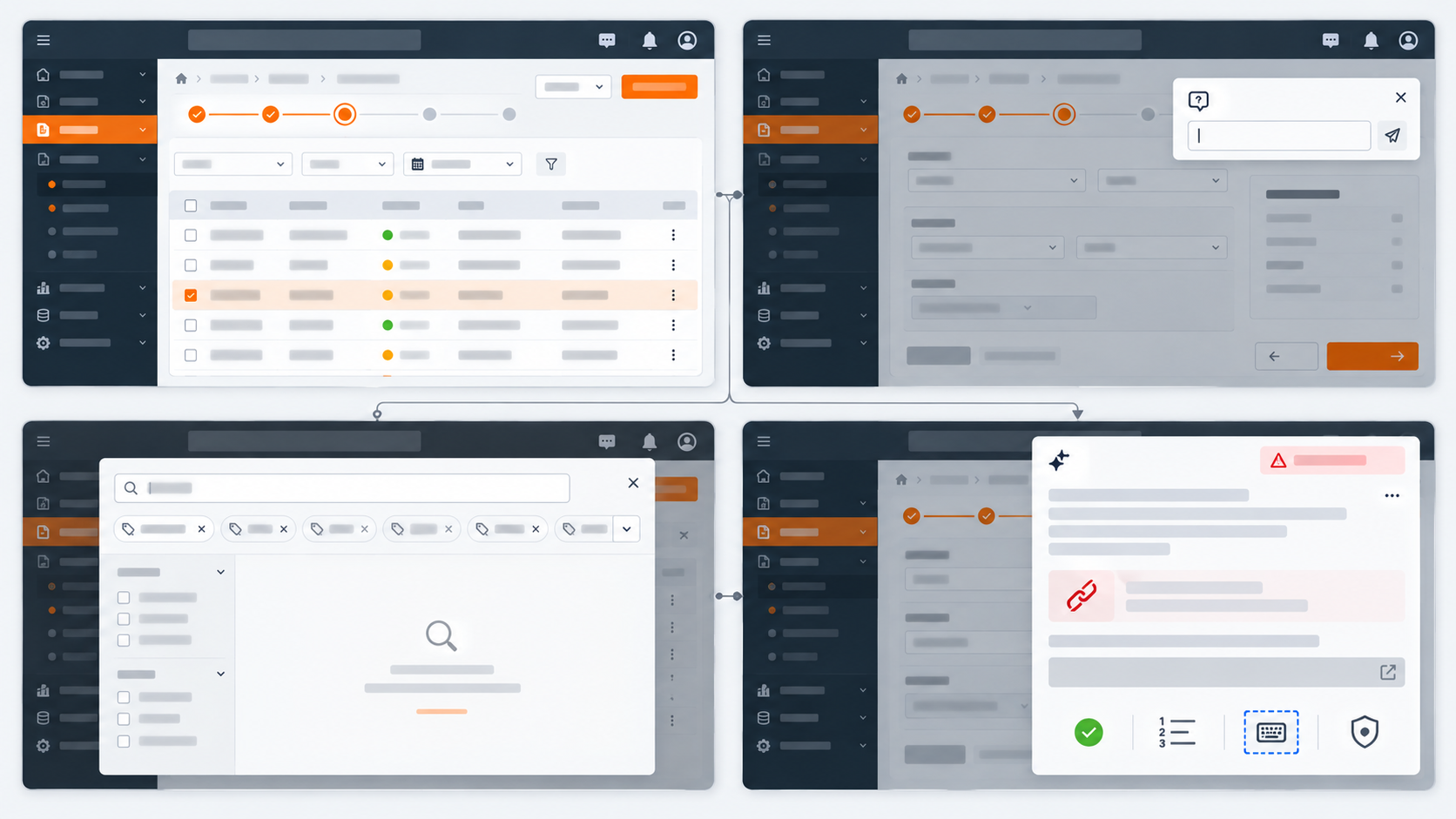
2. My role
My responsibilities:
Conversational flows (fallback, clarification recovery, happy path etc.)
Voice and tone
Response patterns
Suggested prompts
Action labels and links
Accessibility review
UAT (recommendations and documentation)
Collaboration with product, design, engineering, and AI teams
The AI assistant was initially developed by a New Zealand-based team for internal use. When the project expanded to a customer-facing experience, I joined the effort to help adapt the conversational content for external users.
I reviewed existing responses, rewrote content for clarity and consistency, recommended interaction improvements, and helped establish content patterns, accessibility considerations, and testing criteria. My focus was making the experience understandable, actionable, and trustworthy for customers.
I created reusable response patterns that combined direct answers, numbered instructions, descriptive actions, feedback controls, follow-up guidance, and transparent recovery when the assistant could not verify an answer.
3. Creating a conversational experience
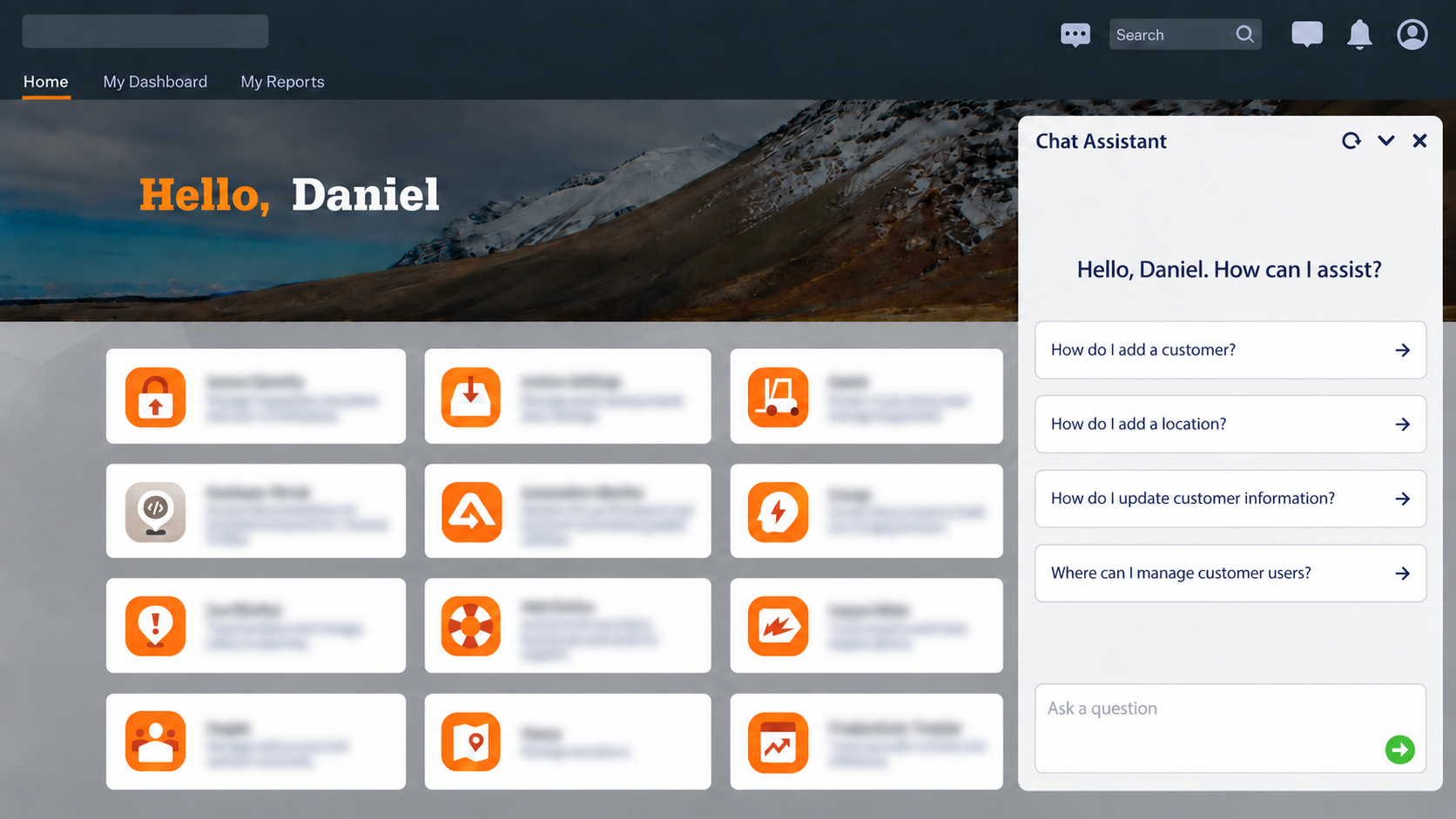
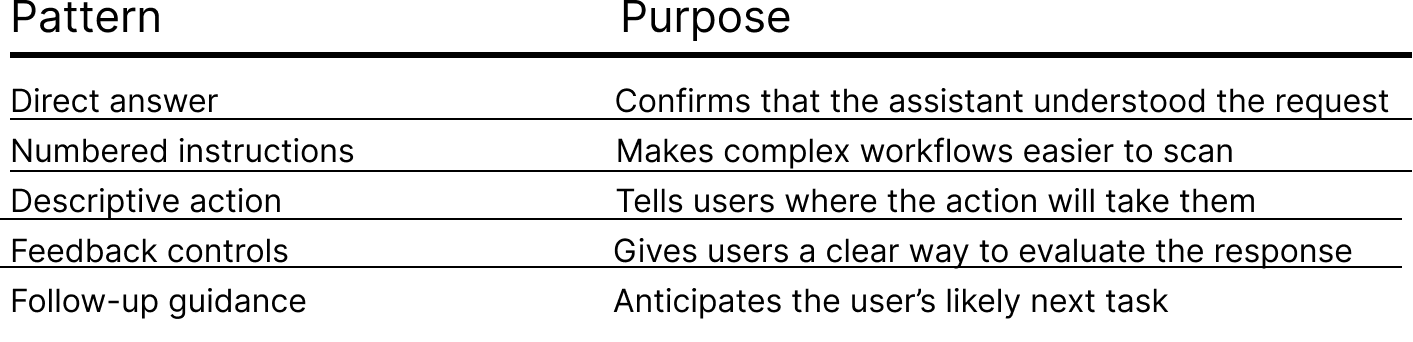
The response model
I created reusable response patterns that helped the assistant deliver clear, actionable, and consistent guidance.
Conversational flows and content decisions
I helped shape the chatbot experience through reusable content patterns and interaction recommendations. Each addresses a different user need, including successful task completion, clarification and error handling,
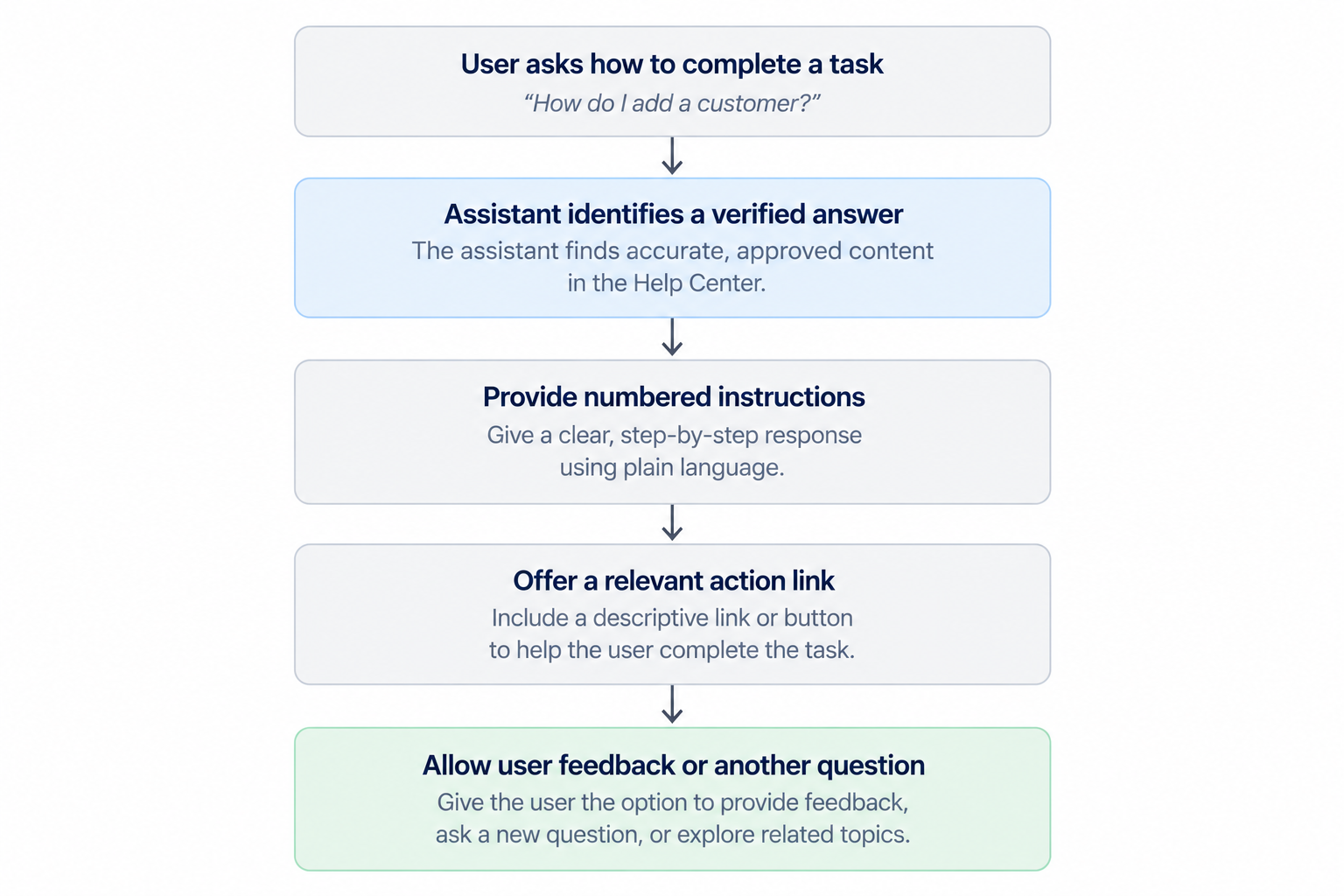
Happy path
Shows the ideal conversation: user asks a question, assistant provides verified instructions, and offers an action.
Content design focus: Successful task guidance.
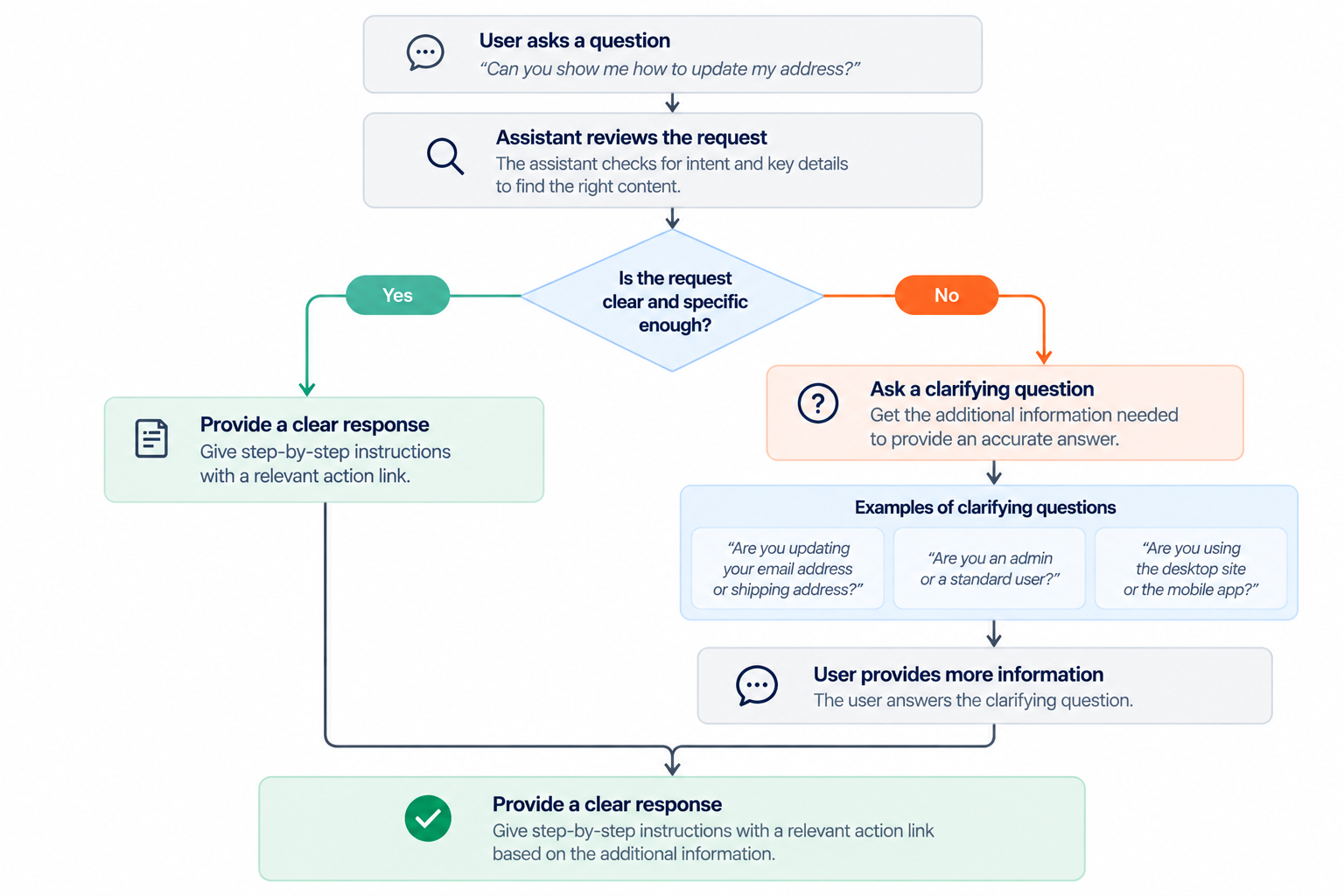
Clarification flow
Shows how the assistant requests additional information when a user's question is ambiguous or incomplete.
Content design focus: Context-aware conversations that improve response relevance and accuracy.
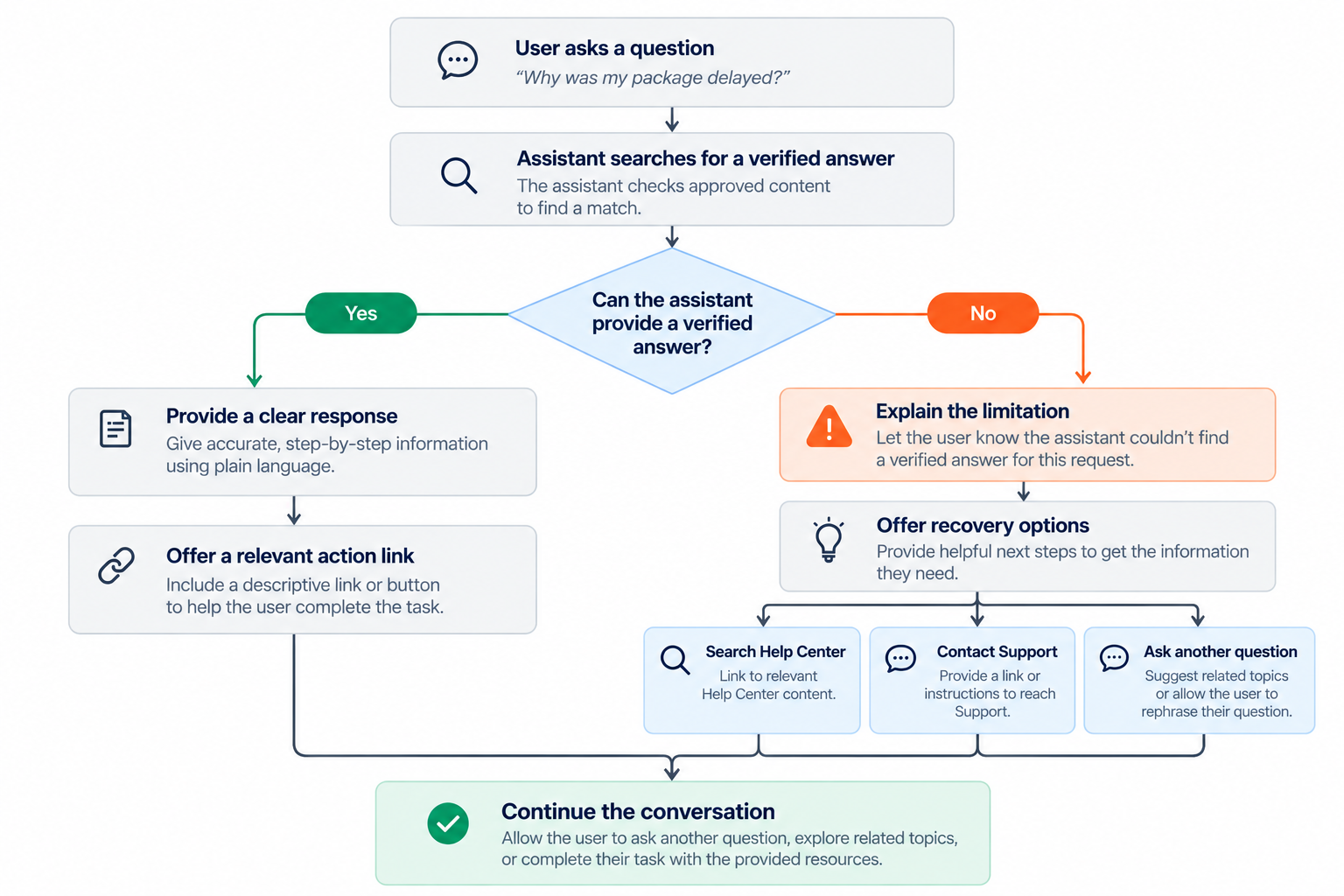
Error flow
Shows how the assistant handles an unsuccessful interaction by communicating the issue and providing a clear path forward.
Content design focus: Transparent error messaging that reduces confusion and helps users continue.
Verified answers and recommended actions
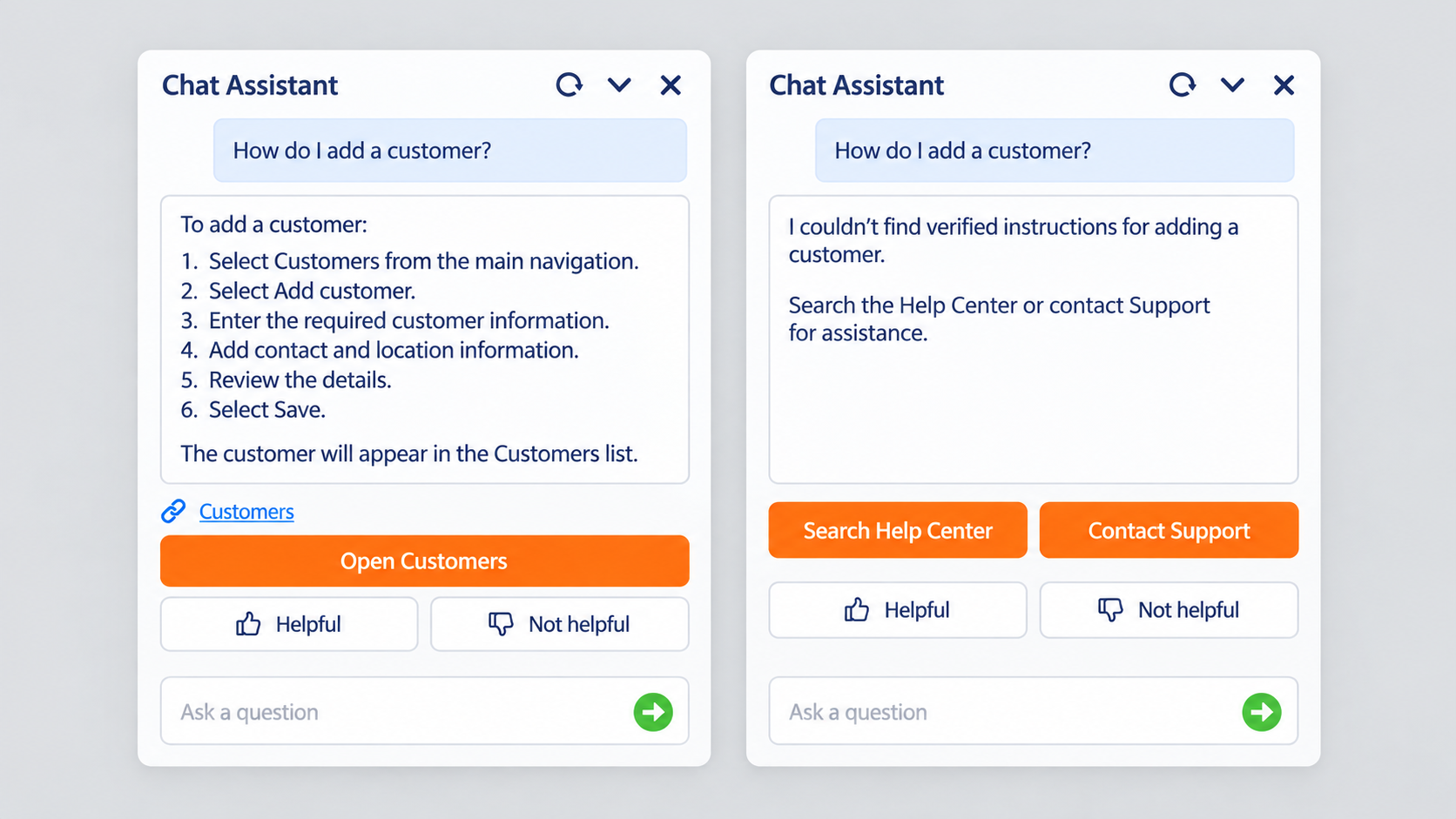
I confirmed that the assistant did not invent instructions when it could not verify an answer. The recovery pattern stated the limitation, identified the unresolved task, and provided clear next steps.
4. Designing for accessibility
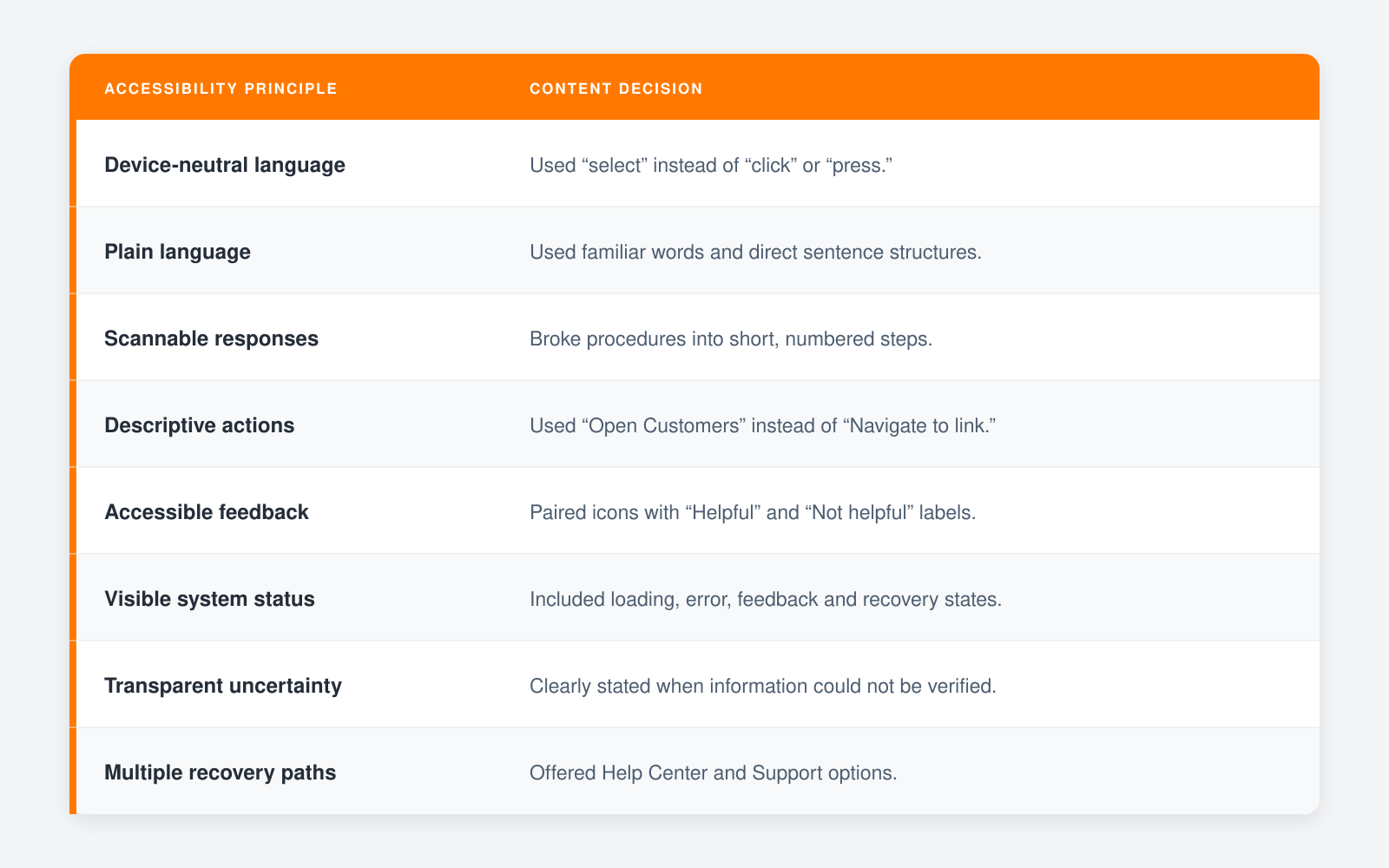
Accessibility was part of the response model from the beginning. I considered how users would understand instructions with a screen reader, keyboard, magnification, limited product knowledge, or increased cognitive load. These recommendations improve clarity for all users, including those who use assistive technology.
5. Testing and improving the chatbot experience
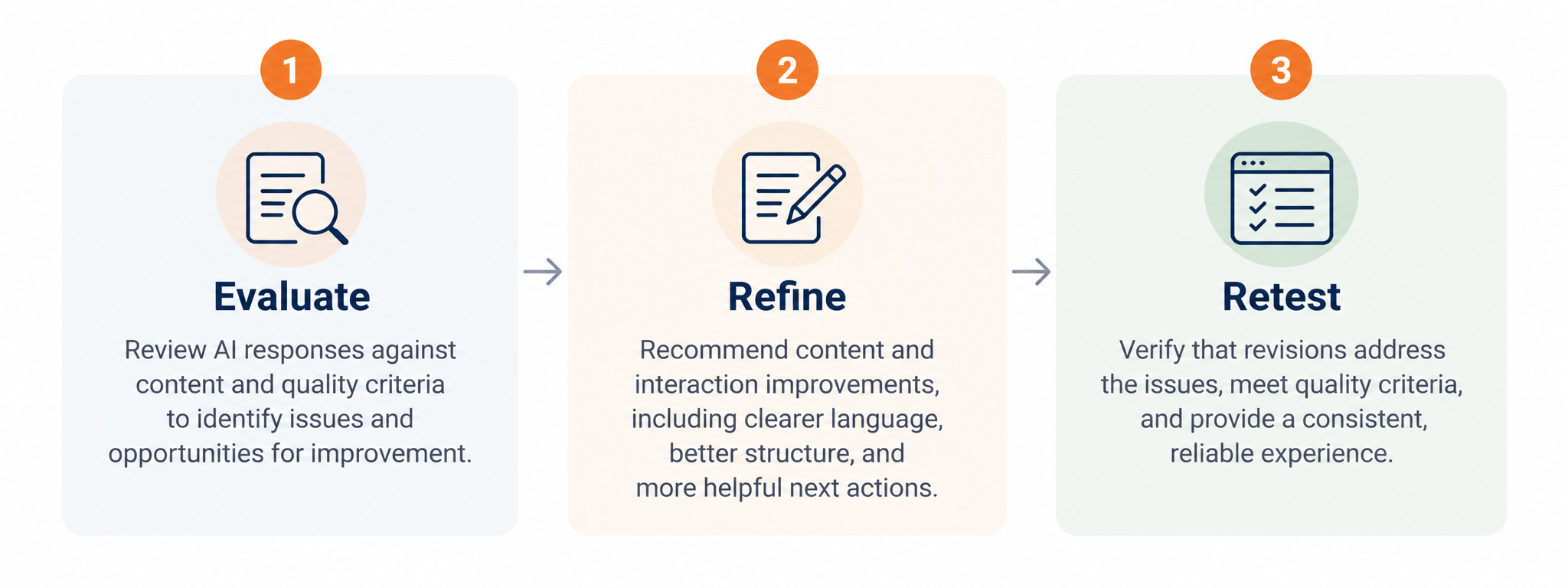
I supported user acceptance testing for the AI assistant. I evaluated whether responses were accurate, actionable, easy to understand, and connected to the right Help Center content. I did this manually and with the help of AI.
I also reviewed interaction details such as suggested prompts, action labels, loading states, feedback, recovery behavior, and error handling. I documented issues, partnered with the product team on refinements, and retested the experience.
Evaluating AI response quality
During user acceptance testing (UAT), I evaluated chatbot responses against six quality criteria to identify content issues, recommend improvements, and support a reliable customer experience.
Accuracy: Responses needed to provide factually correct information to prevent users from following incorrect instructions or making costly mistakes.
Instruction-following: Responses needed to follow established guidelines, constraints, and requirements to maintain predictable, consistent behavior.
Relevance: Responses needed to directly address the user's question or intent to reduce unnecessary information and help users find answers efficiently.
Completeness: Responses needed to provide enough information for users to understand and complete a task without unnecessary follow-up questions.
Accessibility: Responses needed to use clear, inclusive language and accessible content patterns so users with different abilities could understand and act on the guidance.
Brand voice and tone: Responses needed to reflect established communication standards to create a consistent, professional, and trustworthy experience.
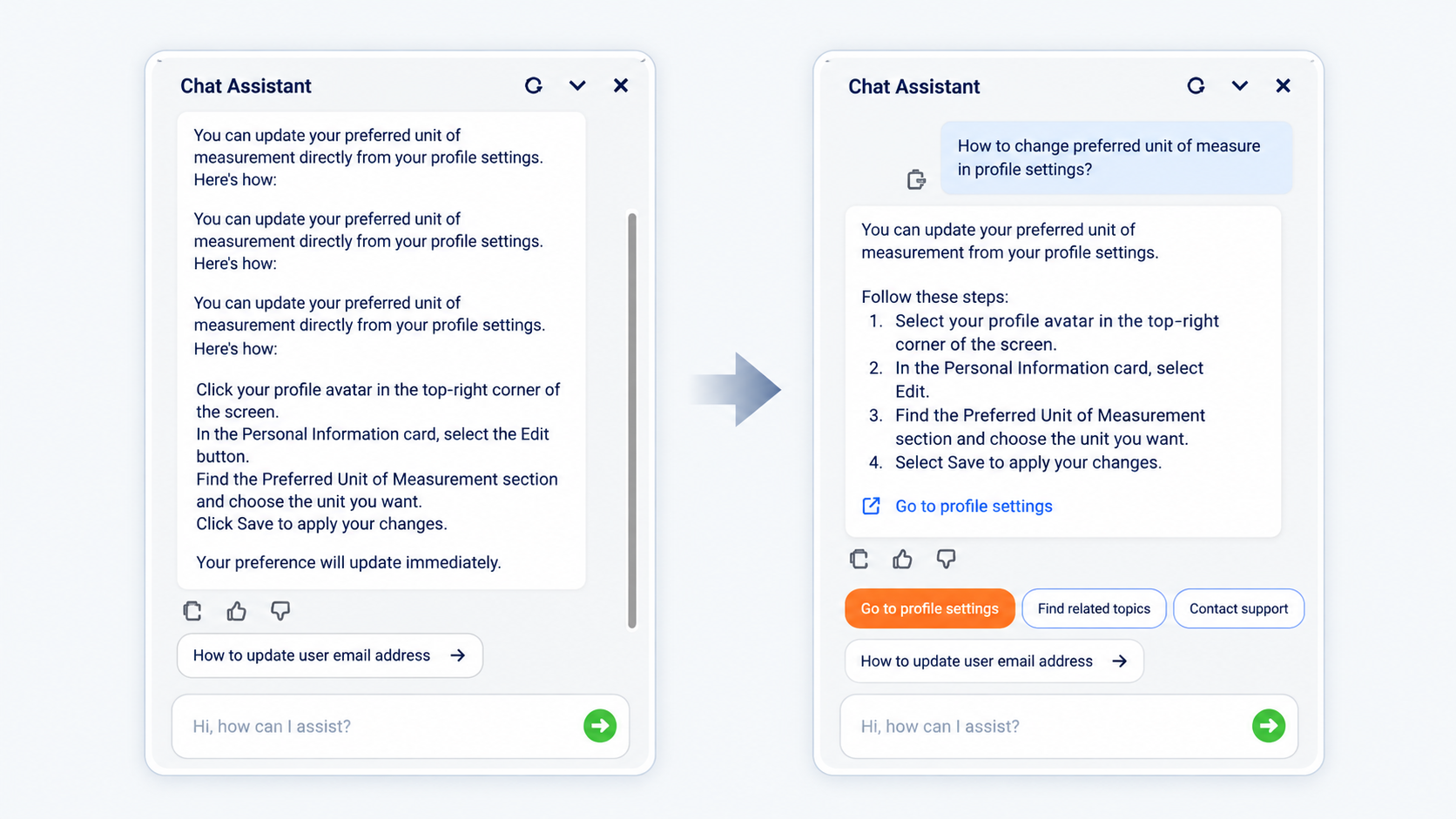
From repetitive answers to actionable guidance
The revised response removes repetition, organizes instructions into scannable steps, aligns terminology with the interface, and provides a clear next action. These changes help users find relevant information and complete tasks more efficiently.
6. The impact
My contributions helped transform an internally developed AI assistant into a more consistent, accessible, and actionable customer-facing experience. By establishing reusable content patterns, refining conversational responses, and supporting quality assurance, I helped create a stronger foundation for trustworthy AI interactions.
Key outcomes
Clearer task guidance: Replaced repetitive or overly complex responses with concise, structured instructions to help users understand their next steps.
More trustworthy interactions: Recommended transparent messaging when the assistant could not verify an answer, reducing the risk of misleading guidance.
Improved accessibility: Applied plain language, device-neutral terminology, and scannable content patterns to make instructions easier to understand and follow.
Greater content consistency: Established reusable response patterns and voice and tone recommendations to support a cohesive experience across interactions.
A more structured testing process: Evaluated AI responses against defined quality criteria, documented issues, recommended improvements, and supported retesting.
Key takeaways
Adapting an AI assistant for customers requires more than rewriting responses. It means anticipating user needs, establishing boundaries for reliable guidance, and designing content that helps people move forward even when the assistant cannot provide an answer.